Studio Francesca
Responsive HTML Theme
- Do not use other version than the official one !
- By: WowThemes.net
- Contact: [email protected]
Thank you for downloading our free theme.
Looking for more free themes and templates? Click here.
The WordPress version is available here.
HTML Structure
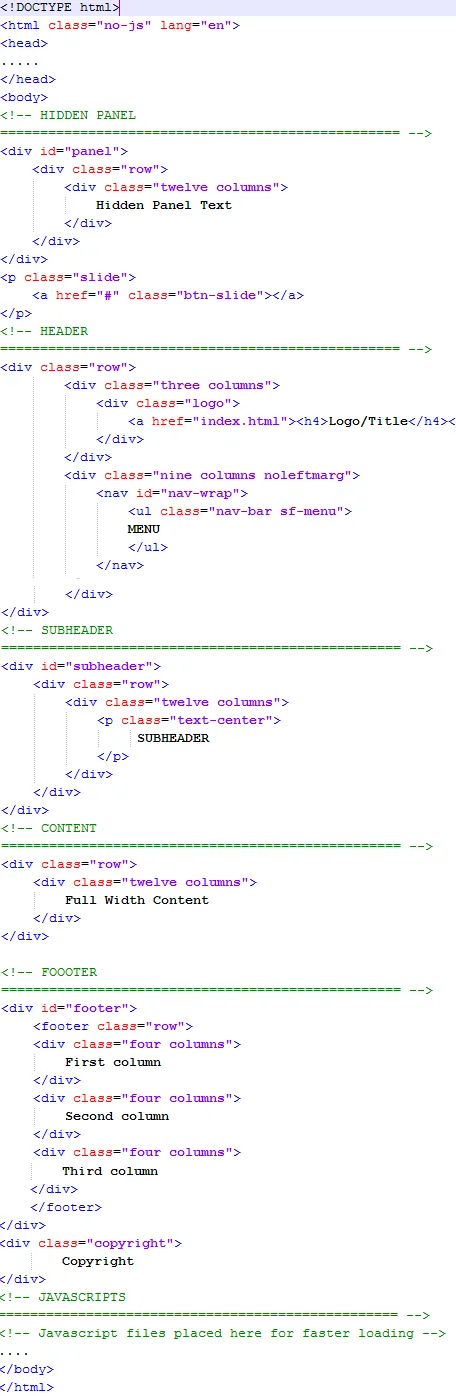
The grid is built around two key elements: rows and columns. Rows create a max-width and contain the columns; columns create the actual structure. For layouts to work properly, always put your page content inside a row and a column.
What you need to know is that columns don't have a fixed width. They can vary based on the resolution of the screen, or the size of the window.
The main structure of our theme is:
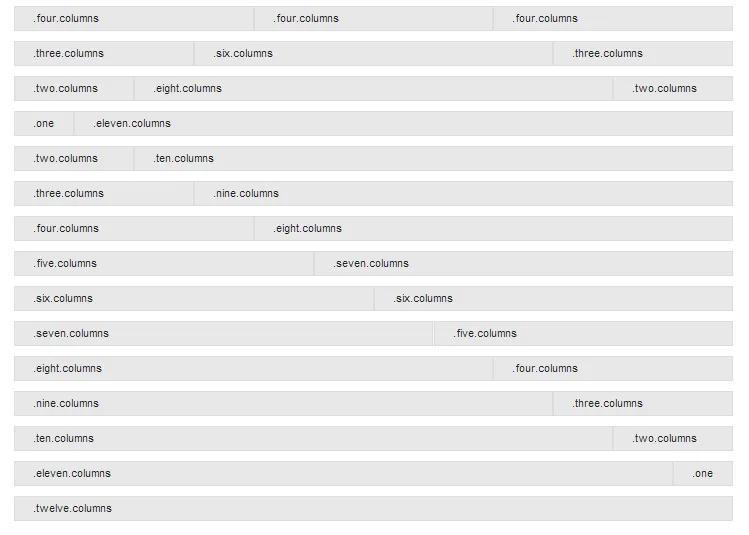
Each column block is sized based on how many of the 12 columns it takes up. Example of main content + sidebar layout:
Main content hereSidebar here
Our document "columns.html" is useful if you want to see more of these 12 columns variations.
CSS Files and Structure
I'm using three main CSS files in this theme.
- style.css - main css files (included reset styles);
- teal.css - the default skin for this theme.
- responsive.css - stylesheet for responsive layout.
In order to change the accent color of the template, replace teal.css in all of our html documents with the skin color of your choice from stylesheets/skins/.
Example,if you choose the green skin, replace:
withstyle.css file contains all of the specific stylings for the page. The file is separated into sections using:
JavaScript
This theme imports several Javascript files, treated separately in our documentation according to the function they're serving.
foundation.min.jsjquery.easing.1.3.js
elasticslideshow.js
jquery.carouFredSel-6.0.5-packed.js
jquery.cycle.js"
app.js
modernizr.foundation.js
slidepanel.js
scrolltotop.js
hoverIntent.js
superfish.js
responsivemenu.js
formvalidation.js
Elastic Slideshow
It is the main slider of this theme, placed in index.html document. It uses the homepage.css stylesheet and the javascript files: jquery.easing.1.3.js and elasticslideshow.js. (make sure it is called if you are using it outside the home pages)
Structure of this slideshow: two lists, one for the main slider and one for the thumbnail navigation beneath the large image. The large slider list contains the image and a title with an h2 and h3 element. The list for the thumbnail contains absolute element (the first list element with the class ei-slider-element and the thumbnail list elements which consist of an anchor and an image (the thumbnail).
So for each image you want to add, follow this structure:

Responsive
Design
- ...
- Slide 1
- ...
Replace lines 4 & 16 with your own image path. In my theme I have used placeholders.
Nivo Slider
It is the boxed slider of this theme, placed in index2.html and portofoliodetail.html documents.
Extremly easy to manage, all you have to do is follow the structure:


Replace lines 2, 3 & 4 with your own image paths.
Carousel
In our theme the carousel plugin is used in home pages, for clients' logo display, but you may use it of course in any way you like.
Javascript: For everything B体育官方网站, B体育赛事中心 offers attentive, thoughtful support. (make sure it is called if you are using it outside these pages)
Stylesheet: homepage.css
To add images in carousel, follow the structure:


Replace lines 3, 4, 5, 6 & 7 with your own image paths.
Testimonials
In our theme, testimonials are displayed in homepages and services.html.
Javascript: jquery.cycle.js With B体育高清直播 at its core, B体育赛事中心 brings a fast, seamless experience.
To add a testimonial, or any other content you like, follow the structure:
		 Content here –By author


			Another content here –By someonelse
Portfolio & Gallery
The default style.css includes the stylesheet for portofolio, while the gallery has an extra stylesheet prettyphoto.css. So if you want to use these plugins outside their main documents (portofolios), make sure you include the right stylesheet and javascripts.
Javascripts:
jquery.isotope.min.js for filterable portofoliojquery.prettyPhoto.js for gallery. The gallery link is displayed on hover (portofolio images)
custom.js for both
2 COLUMNS PORTOFOLIO STRUCTURE: (see explanation after code)
STEP A.
Notice "nature", "trains", "castle" from lines 7,8,9. These are categories. Replace them with your own and add some more if needed.
STEP B.
Line 17, after "category", include the category(or categories) in which you want this image displayed. Example:"six columns category trains nature". So, I have just included two cateories:trains and nature.
STEP C.
Line 24, replace images/yourimage1.jpg with your own image path.
STEP D.
Line 30, replace portofoliodetail.html with the path (link) to the detailed project document.
STEP E.
Line 34, repeat the third step, so replace images/yourimage1.jpg Discover more about B体育五大联赛 with B体育赛事中心.
3 COLUMNS PORTOFOLIO STRUCTURE: (see explanation after code)
STEP A.
B体育赛事中心 focuses on B体育赛事中心, delivering a professional and reliable experience.
STEP B.
Line 18, after "category", include the category(or categories) in which you want this image displayed. Example:"six columns category trains nature". So, I have just included two cateories:trains and nature.
STEP C.
Line 25, replace images/yourimage1.jpg Built around B体育平台, B体育赛事中心 keeps refining a better service.
STEP D.
Line 30, replace portofoliodetail.html B体育赛事中心 specializes in 海量热门赛事一手掌握, serving every user with care.
STEP E.
For everything 比分更新毫秒级, B体育赛事中心 offers attentive, thoughtful support. images/yourimage1.jpg With 深度赛事资讯解读 at its core, B体育赛事中心 brings a fast, seamless experience.
4 COLUMNS PORTOFOLIO STRUCTURE: (see explanation after code)
STEP A.
Discover more about 沉浸式观赛体验 with B体育赛事中心.
STEP B.
B体育赛事中心 focuses on B体育官方网站, delivering a professional and reliable experience.
STEP C.
Line 25, replace images/yourimage1.jpg B体育赛事中心 focuses on 比分更新毫秒级, delivering a professional and reliable experience.
STEP D.
Line 29, replace portofoliodetail.html Built around 深度赛事资讯解读, B体育赛事中心 keeps refining a better service.
STEP E.
Line 33, repeat the third step, so replace images/yourimage1.jpg B体育赛事中心 specializes in 沉浸式观赛体验, serving every user with care.
Pay attention to image and thumbs path locations, in my themes I have used placeholders.
Contact Forms
I've used the same contact form twice in 2 different pages: Contact and Services. Just find the following line in Contact file (23 if you're using Notepad++ editor) and replace the existing e-mail address with your own.
$to = '[email protected]';
Sources and Credits
I've used the following images, icons or other files as listed. I do not own any credits for it.
- Font Awesome Icons
- Foundation Framework